The growing cult of the iPod. MP3 player compatibility as automotive selling points. Either the youth of America is taking over, or this stuff is not just for kids. Music = life. You heart music. Admit it. Then go visit these two sites…
Last.fm calls itself the social music revolution. Hit the front page, type in a band and Last.fm will pull up ordered lists of the bands most popular songs, similar artists, and play new recommendations based on your taste. You create a personal radio station, Last.fm uses your preferences to build its fantastic infrastructure of profiled recommendations. What's not to like?
Pandora, created by Music Genome Project crew, can be equated to asking your music buff friend for album recommendations. Only there are a lot more music buff brains behind this answer… and you don't even have to buy them a drink. Cheers!
Filed under: technology
A guide to the big computer question: fix it – or buy new?
(Applies to windows systems xp or prior.)
1. Is the computer running Windows XP? (Yes-go on) (No-buy new)
2. Was the orginal operating system 98SE or XP? (Yes-go on) (No-buy new)
3. Does the unit require hardware repairs possibly totaling over $250? (Yes-buy new) (No-go on)
4. Can you play music and search the internet at the same time without having the music skip? (Yes- go on) (No- buy new)
5. Do you like the one you have and is it working perfectly? (No- buy new) (Yes- why are you reading this??)
The number one question I answer at work is some form of inquiry as to the insane possibility of being both female and a computer technician. The second is the question of how I've "earned the clip on tie" – how did you learn all this stuff?
I learned by playing around on our home computer, and getting in lots of trouble for doing so. I learned by working on my grandmother's mac, because she didn't know enough to know what I was doing, and I couldn't get in trouble. I learned by building my own computer, with the help of a friend, and then blowing up a power supply and a video card and letting the smoke out of some wires.
People always ask me how I earned this clip on tie. I tell them it's just continued punishment. They laugh. Hey, you wanna wear this thing?
I unapologetically acquired an old mac last week. Here's what brought that on…
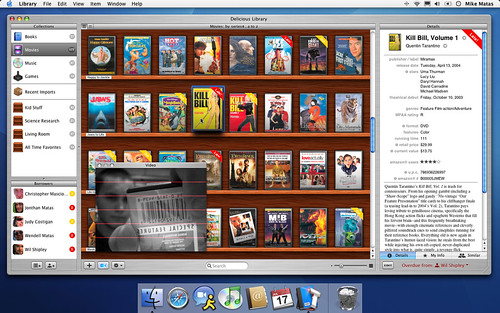
Delicious Monster has done an incredibly fantastic make-you-wish-you-owned-a-mac job with their library program – aesthetics and functionality alike will knock your socks off. I'm hoping to see more cool toys from these guys in the future. Check it out. You might even want to get a Mac.

JVC has announced a new line of MP3 players. Their big news draw is the built in ability to convert analog to digital – legalities aside, that’s sweet. But sweet tricks won’t cover the fact that these shiny metal things come in 512MB and 1G sizes.

1G? Honestly. Maybe they’re just starting small… but they’ve got a long way to go to catch up with the ever popular cult brand that comes in 30 and 60 gigs. That’s 15,000 songs versus 120 at 512MB. My grandparents own more CDs than that.
Sorry JVC, but you haven’t wowed us yet. I still don’t own an ipod, though, so if you’re starting small, get moving!
Everybody runs into those puzzling, unfix-able computer problems.
There is a suprisingly simple yet often unthought of solution to most of these problems: google it! You don't even have to know what your problem is, just put in what you do know, and hit search. It's like magic.
Example one: You took your computer in to the school techs to have your data transferred from an old tower to a notebook. Now the CD drive doesn't work, and they say there's a driver missing that's impossible to reinstall. All you know is that the rogue driver is labeled i.link cdrw 1394 ieee. Having no clue what this might mean doesn't matter! Outsmart your school techs: google it!
If you google i.link ieee, you'll begin to get the idea that this drive is an external drive or part of a docking station. You'll also notice that you're not the only one running into trouble with these drivers disappearing and not reloading.
One of your search results will probably send you to Microsoft's support site, which is a very valuable tool in itself. Here, select your operating system (that's the name you read when your computer turns on: Windows ME, 98, 2000, XP, ect.), then search for your problem. In this case, selecting Windows 2000 and searching IEEE brought up a list of articles. I clicked on the headline, "IEEE 1394 Device May Disappear" . . .
Boom. Two minutes of reading and you'll have a clearer idea of what's wrong and, more importantly, how to fix it!
Then print out the page and hand it to those undereducated IT guys!
Filed under: technology
Want to sound like you actually know what you're talking about when you walk into an electronics store to buy memory? A typical conversation starts with a simple question: how much will it cost to buy more memory for my computer? From there, the already-tired-of-these-questions technician will reply rapid fire: "How much? Laptop or Desktop? Do you know what speed?" and then, pausing for air while evaluating the perplexed look on your down trodden face, the technician will continue, "OK, well do you know what model computer it is?" and finally, "Why don't you just bring it in for me to take a look at it?"
So you go home, frustrated and no longer feeling like a man. You get your digital camera and when your wife's not looking you take a picture of the back of the computer so you know exactly how to plug in all those wires once you get back home. You lug the computer off to the store, stand in line for what seems like hours, and return to the same technician. In exactly point three seconds, they have the case opened, the memory out, and the new memory off the shelf. You, still trying to figure out just what went on in those point three seconds, look with horror or joy at the price tag (depending on the day) and back at the technician, who is staring at you wondering if you need help finding your credit card too.
Let me save you (and the technician) some trouble… before you go trolling off to the store, use this very special trick. Visit Kingston or PNY's websites, enter your computer information* (either on the front or back of your computer case or the bottom of your laptop) and you'll be able to find – and even order – exactly what you need. It's important to note these three things:
1. Max amount of memory your computer can handle
2. The speed required: PC 100,133,2100,2700,3200,4200 for example
3. The number of slots you have free
That's it! From all the technicians in retail around the world, thank you.
*A note on Sony units: Sony generally gives two model numbers, on laptops one is on the bottom panel and one is by the lcd screen. If one doesn't match try the other.
but you have to hand it to them anyway…

celebrating 4/1 a bit early seems to be the trend this year, and Think Geek has my vote so far. We have yet to see if Google can top the ingenuity of USB Desktop Tanning Centers, Wireless Microwave Extension Cords, and the above illustrated Caffeine Inhaler. If only they weren't fooling…
Filed under: technology
Although spyware is by far and away the most common computer issue, the most frustrating problems all relate to power. Power problems are indicated by symptoms such as units rebooting automatically out of thin air (also indicitive of the condition known as Mac), extremely slow processes, or times of not booting. The easiest to remedy is what I call the "homebuilt virus" – incorrectly configured wiring. Power being the blood of your unit, it's important to get good, strong, and clean power and direct its flow correctly.
The first thing you can do is buy a decent power supply. Reading a few reviews on Mvave or Newegg will give you a good idea what's good and what's just cheap. My mother used to tell me that horses will eat whatever you give them without stopping, even eating themselves to death. Thankfully, computers know when to stop: there is therefore no such thing as "too much power." More components demand more power, video cards specifically pull a large amount. Make sure you order a supply that will do the job! PC World has a good chart to estimate needed power.
If you order a good power supply, you'll have plenty of connectors to do the job properly. Plug your fans and case accessories on one connector line, your optical drives on another, and your hard drives on their own line. This will insure proper flow of good, clean, strong power to your hard drives. Connecting hard drives in line with case fans (which turn on first) will result in poor performance.
Once you're running well setup system, the first thing to check for when experiencing slowness or rebooting is bulged capacitors on the motherboard. Capacitors condition DC voltage, providing a clean and constant supply of power to components by absorbing spikes and supplementing lows. The stored electronic charge in a capacitor can be discharged as needed, supplying power as your system demands.
Bad capacitors look like frozen soda cans or exploded batteries: noticibly bad!

Bulged or exploded capacitors are caused by a bad PSU or a short on the motherboard. It's important to note that bulged capacitors don't always cause issues, however if you keep running your system, it's reasonable to expect things will get worse, and you may cause damage to other components. If you see bulged capacitors in your system, start looking into things. If you see leaked electrolyte (usually a brownish deposit on the top or side of the capacitor), pull all power and replace that board!
It is possible to replace the bad capacitors or have them replaced by the manufacturer or a repair centre, but in this age of disposable technology, it's often preferred to just replace the board. Of course, if it's going to cost you $300 plus to do that, go out to the garage, unsolder those ugly things, and replace them! (With care and proper knowledge, of course, the author of this article not to be held responsible.)
And one more thing: don't put a screwdriver across the terminals.
 the fallout: on the other side